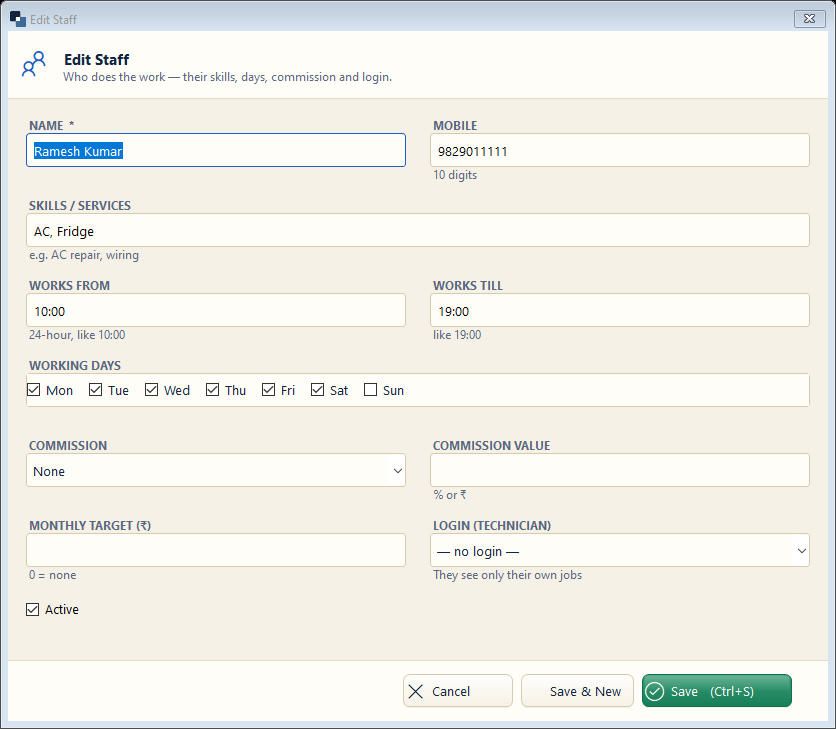
Services → Staff → New Staff. People who do the work — for appointments, job cards and commission.
👆 Click a number to see the field
1
Name and mobile
What to enter: Staff member's name and 10-digit mobile.
Why: Shown on job cards and appointment slots.
Example:
Ramesh Kumar2
Skills / services
What to enter: What this person can do.
Why: Helps when you assign work.
Example:
AC, Fridge3
Working hours and days
What to enter: From / till time and working days.
Why: Appointments are offered only in these hours.
Example:
10:00 – 19:004
Commission and target
What to enter: Commission type, value and monthly target.
Why: Staff Commission report pays them correctly.
Example:
10%5
Login (technician)
What to enter: Optional — link a user so they see only their own jobs on the phone app.
Why: Technicians update job status from the field.
6
Save
What to enter: Click Save.
Why: