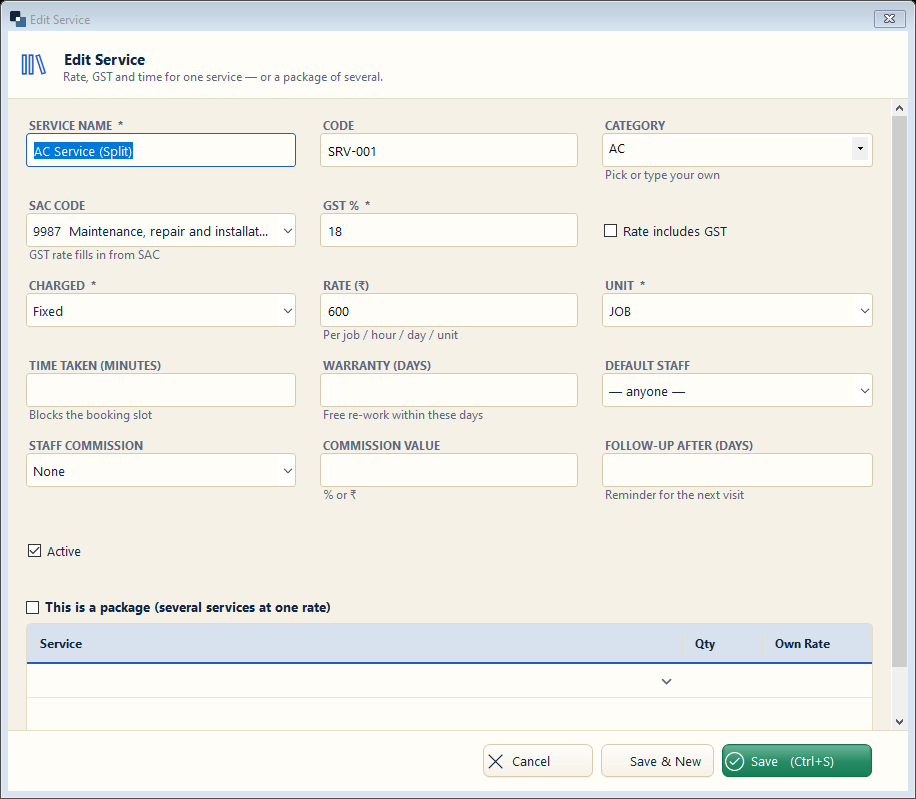
Services → Services → New Service. Everything you charge for, with its rate, GST and the time it takes.
👆 Click a number to see the field
1
Service name *
What to enter: Name printed on the bill.
Why: Customers see this name.
Example:
AC Service (Split)2
Category
What to enter: Group similar services.
Why: Reports and the booking screen use it.
Example:
AC3
SAC code and GST %
What to enter: Pick the SAC code — GST fills itself.
Why: Needed on GST bills.
Example:
9987 · 18%4
Charged and rate
What to enter: Fixed, hourly, daily or per unit, and the rate.
Why: The bill line is filled from here.
Example:
Fixed · ₹6005
Time taken and warranty
What to enter: Minutes the work takes and free re-work days.
Why: Time blocks the appointment slot; warranty jobs are free.
Example:
60 min · 30 days6
Default staff and follow-up
What to enter: Who usually does it, and when to remind the customer again.
Why: Customer reminders are made from the follow-up days.
Example:
Ramesh · 90 days7
Staff commission
What to enter: % or ₹ the staff member earns on this service.
Why: Calculated in Staff Commission by itself.
Example:
10%8
Save
What to enter: Click Save (or Save & New for the next service).
Why: The service is ready for jobs and bills.