Fill name, GSTIN, state and mobile at least. Other fields are optional and can be filled later.
👆 Click a number to see the field
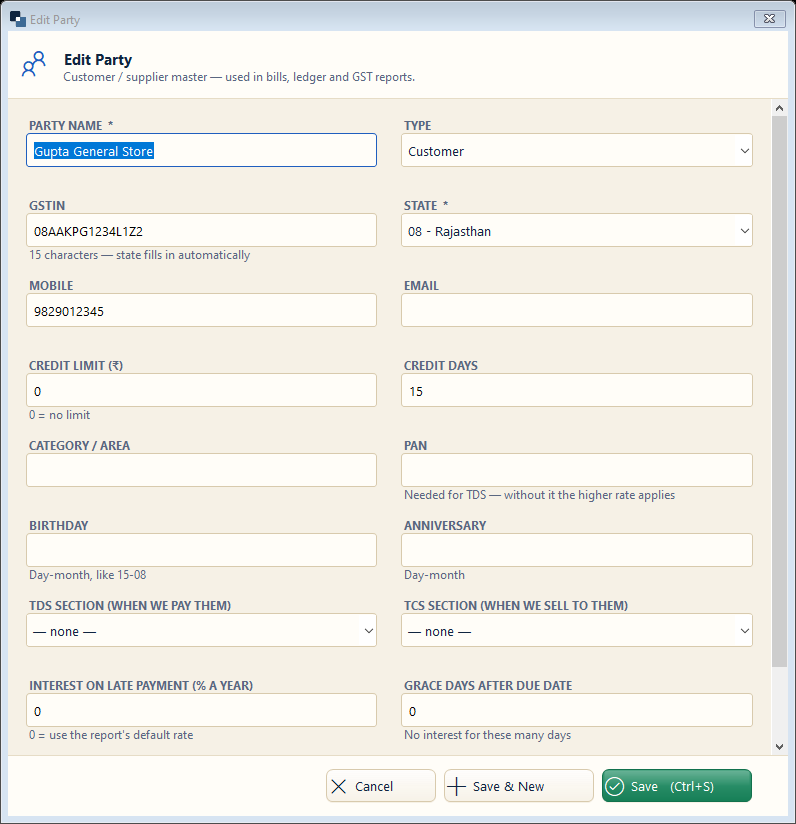
1
Party name *
What to enter: Name of the shop / person.
Why: Printed on bills and statements.
Example:
Gupta General Store2
Type
What to enter: Customer, Supplier or Both.
Why: Decides where the party appears.
Example:
Customer3
GSTIN
What to enter: Party's GST number, if registered.
Why: Needed for B2B tax invoices and GSTR-1.
Example:
08AAKPG1234L1Z24
State *
What to enter: Party's state — filled from GSTIN.
Why: Same state = CGST + SGST, other state = IGST.
Example:
Rajasthan5
Mobile and email
What to enter: For sending bills and reminders.
Why: Bills and due reminders go on WhatsApp / email.
Example:
98290 123456
Credit limit and days
What to enter: Maximum credit and days allowed.
Why: The bill warns (or blocks) when the limit is crossed.
Example:
50,000 / 15 days7
Save
What to enter: Click Save (or Save & New for the next party).
Why: The party is ready for bills.