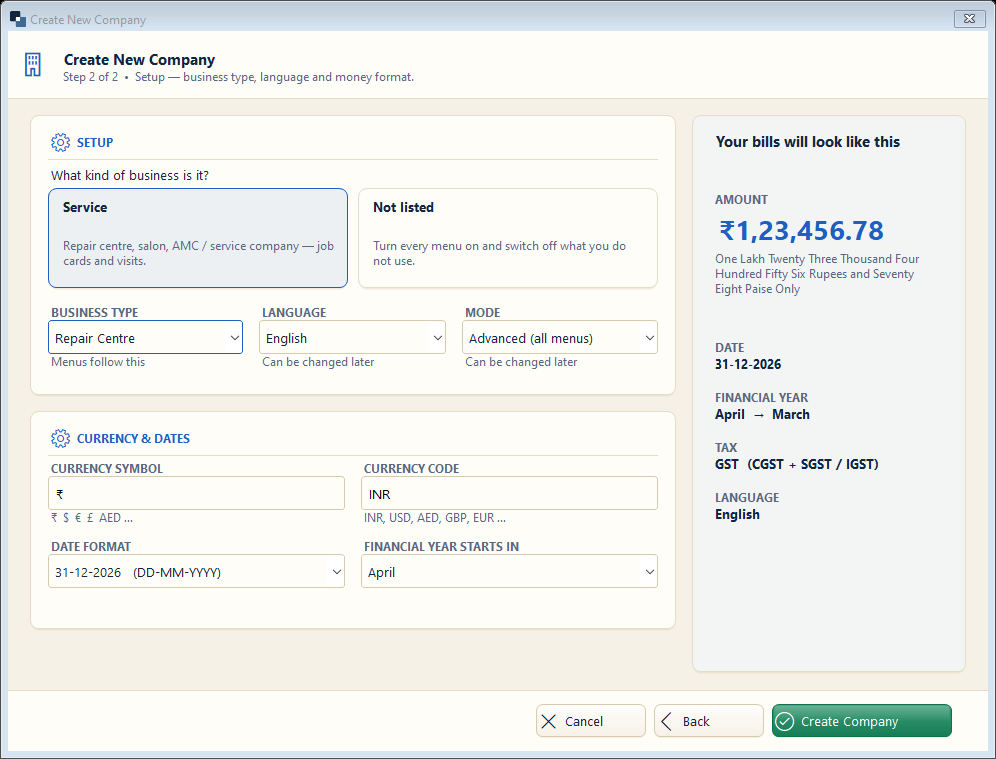
Choose “Service” for a repair centre, salon, AMC / maintenance company, clinic, coaching or any business that sells work instead of goods.
👆 Click a number to see the field
1
Kind of business
What to enter: Click the “Service” card.
Why: Switches on job cards, appointments, AMC, memberships and staff commission.
Example:
Service2
Business type
What to enter: Choose the exact trade — Repair Centre, Salon, AMC company…
Why: Each trade gets its own job steps and item details (brand, model, IMEI…).
Example:
Repair Centre3
Language
What to enter: Language of the screens for this company.
Why: Each company can have its own language.
Example:
English / हिंदी4
Mode
What to enter: Simple = few menus, Advanced = all menus.
Why: Start with Simple if you are new to computers.
Example:
Advanced5
Date format and financial year
What to enter: Keep DD-MM-YYYY and April for India.
Why: Reports, GST and year-end use the financial year.
Example:
April6
Create Company
What to enter: Click Create Company.
Why: The company is created and opens. You can start billing at once.