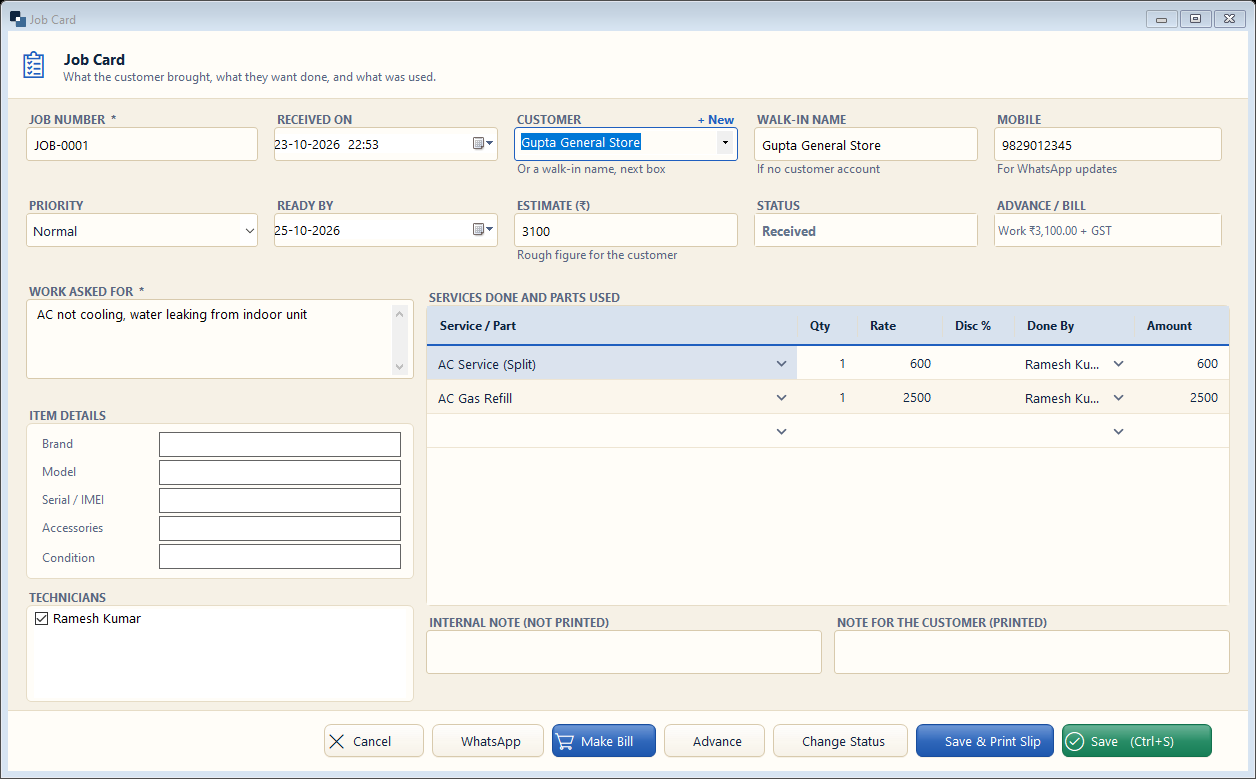
Services → Job Cards → New Job. When a customer gives an item for repair or asks for work, make a job card — a slip is printed and the job is tracked till delivery.
👆 Click a number to see the field
1
Job number and received on
What to enter: Filled automatically.
Why: Printed on the job slip given to the customer.
Example:
JOB-00012
Customer, walk-in name and mobile
What to enter: Choose the customer, or just type a walk-in name and mobile.
Why: Status updates go on WhatsApp to this mobile.
Example:
Gupta General Store3
Priority, ready by, estimate
What to enter: Normal / Urgent, promised date and a rough amount.
Why: Ready-by date shows late jobs in red.
Example:
25-10-2026 · ₹3,1004
Status
What to enter: Current step of the job.
Why: Change it as work moves (or use Change Status).
Example:
Received5
Work asked for *
What to enter: The customer's complaint in their words.
Why: Printed on the slip; technician reads it.
Example:
AC not cooling, water leaking6
Item details
What to enter: Brand, model, serial / IMEI, accessories and condition.
Why: Protects you in a dispute about what was received.
Example:
LG · 1.5 ton7
Services done and parts
What to enter: Add services and spare parts used.
Why: They go straight into the bill.
Example:
AC Service + Gas Refill8
Technicians
What to enter: Who worked on it.
Why: Their commission is counted.
Example:
Ramesh Kumar9
Save / Save & Print Slip
What to enter: Save, or save and print the job slip.
Why: Give the slip to the customer.