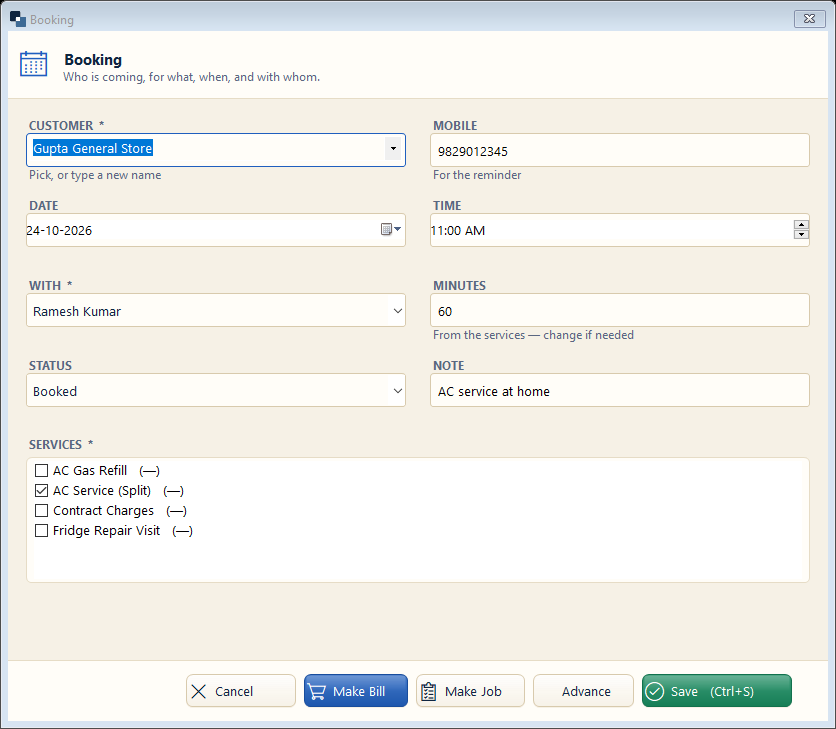
Fill who is coming, when, with whom and for which services.
👆 Click a number to see the field
1
Customer and mobile
What to enter: Pick a customer or type a new name; mobile for the reminder.
Why:
Example:
Gupta General Store2
Date and time
What to enter: Day and start time.
Why:
Example:
24-10-2026 · 11:003
With and minutes
What to enter: Staff member; minutes come from the services.
Why: Two bookings cannot clash for one person.
Example:
Ramesh · 604
Services *
What to enter: Tick the services booked.
Why: Time and rate come from the service master.
Example:
AC Service5
Make Job / Make Bill
What to enter: When the customer arrives, turn the booking into a job or straight into a bill.
Why:
6
Save
What to enter: Click Save.
Why: