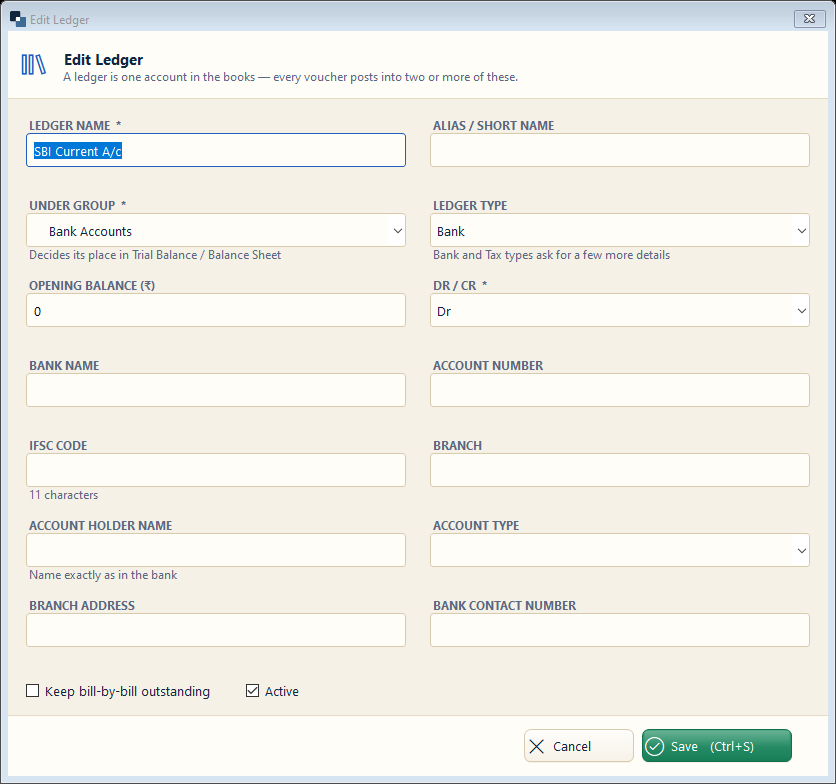
Accounts → Ledgers → New Ledger. Create one ledger for each bank account. The first bank account is linked to UPI, Card, Cheque and NEFT by itself.
👆 Click a number to see the field
1
Ledger name *
What to enter: Bank name and account type.
Why: Shown in receipts, payments and the bank book.
Example:
SBI Current A/c2
Under group *
What to enter: Choose Bank Accounts.
Why: Only ledgers under Bank Accounts are treated as banks.
Example:
Bank Accounts3
Opening balance and Dr / Cr
What to enter: Balance in the bank on the “books start from” date; Dr if money is in the bank.
Why: Makes the bank book match your passbook from day one.
Example:
25,000 Dr4
Bank details
What to enter: Bank name, account number, IFSC and branch.
Why: Printed on bills so customers can pay you.
Example:
SBIN00012345
Save
What to enter: Click Save (Ctrl+S).
Why: The account is ready for receipts and payments.