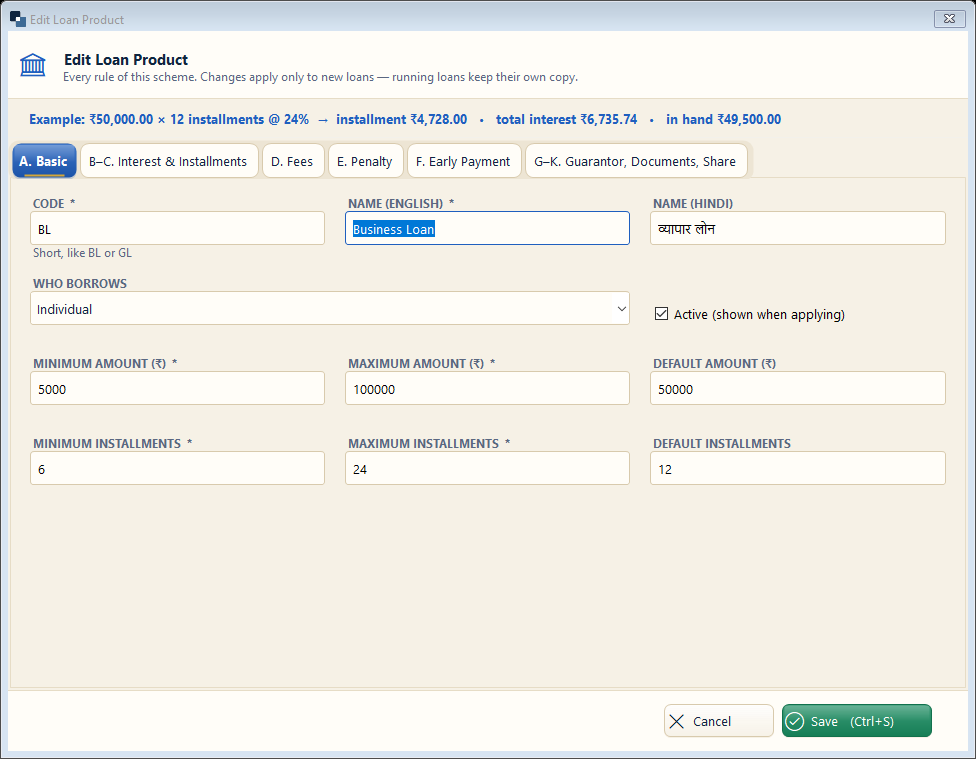
The tabs A to G cover basic details, interest and installments, fees, penalty, early payment, guarantor and documents. The example line at the top shows the EMI as you type.
👆 Click a number to see the field
1
Code *
What to enter: A short code for the scheme.
Why: Printed in loan numbers and reports.
Example:
BL2
Name *
What to enter: Scheme name in English (and Hindi if you like).
Why: Members see this name on receipts and the website.
Example:
Business Loan / व्यापार लोन3
Who borrows
What to enter: Individual, Group (JLG) or SHG.
Why: Group schemes are collected through the group sheet.
Example:
Individual4
Amount range
What to enter: Minimum, maximum and default amount.
Why: Applications outside the range are stopped.
Example:
5,000 – 1,00,0005
Installments
What to enter: Minimum, maximum and default number of installments.
Why: With the frequency (monthly / weekly) it decides the EMI.
Example:
126
Interest, fees, penalty
What to enter: Open the other tabs to set rate, method (flat / reducing), fees and penalty.
Why: These decide the schedule and the late charges.
Example:
24 % reducing7
Save
What to enter: Click Save.
Why: The scheme is ready for applications.