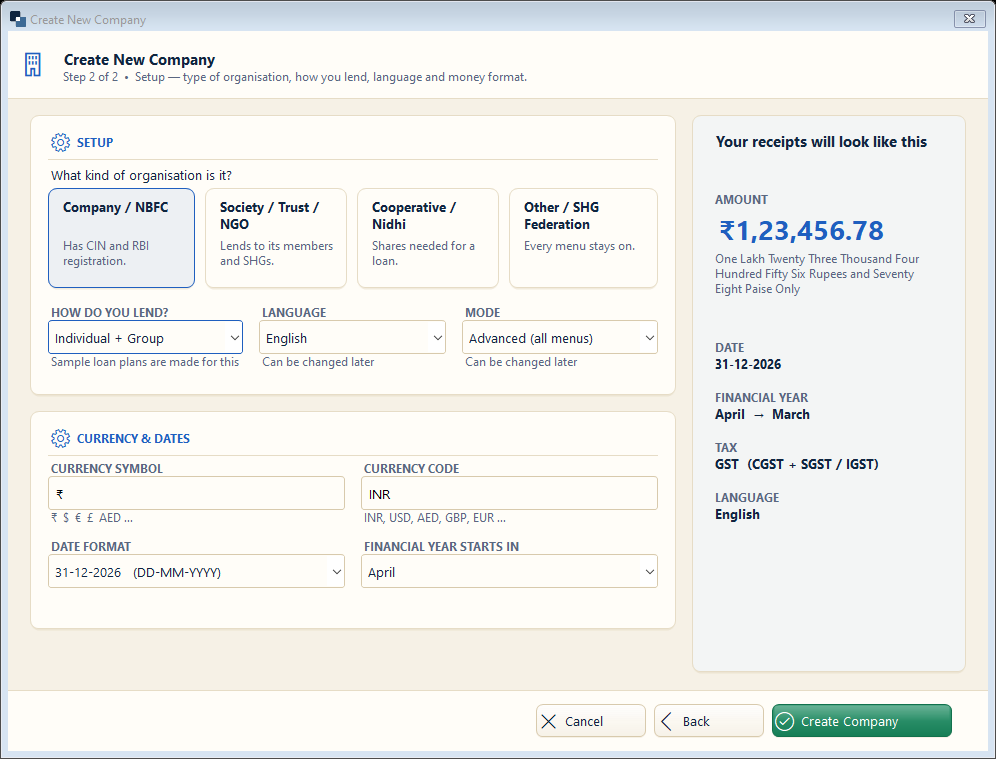
Tell the software what kind of lender you are and how you lend. It switches on the right menus and numbering — all of it can be changed later.
👆 Click a number to see the field
1
Kind of organisation
What to enter: Click the card closest to you: Company / NBFC, Society / Trust / NGO, Cooperative / Nidhi or Other / SHG Federation.
Why: Cooperative / Nidhi asks for shares before a loan; NBFC shows CIN and RBI details.
Example:
Society / Trust / NGO2
How do you lend?
What to enter: Individual, Group (JLG / SHG) or both.
Why: Group lending adds groups, meetings and the group collection sheet.
Example:
Individual + Group3
Language
What to enter: Language of the screens for this company.
Why: Receipts and notices can also print in Hindi.
Example:
English / हिंदी4
Mode
What to enter: Simple = few menus, Advanced = all menus.
Why: Start with Simple if you are new to computers.
Example:
Advanced5
Currency and dates
What to enter: Filled from the country (₹ / INR, DD-MM-YYYY, April).
Why: Reports and year-end use the financial year.
Example:
₹ / INR6
Create Company
What to enter: Click Create Company.
Why: The company is created and opens with ready loan accounts.