Fill these exactly as on your GST / shop registration — they are printed on every bill. Fields with * are required.
👆 Click a number to see the field
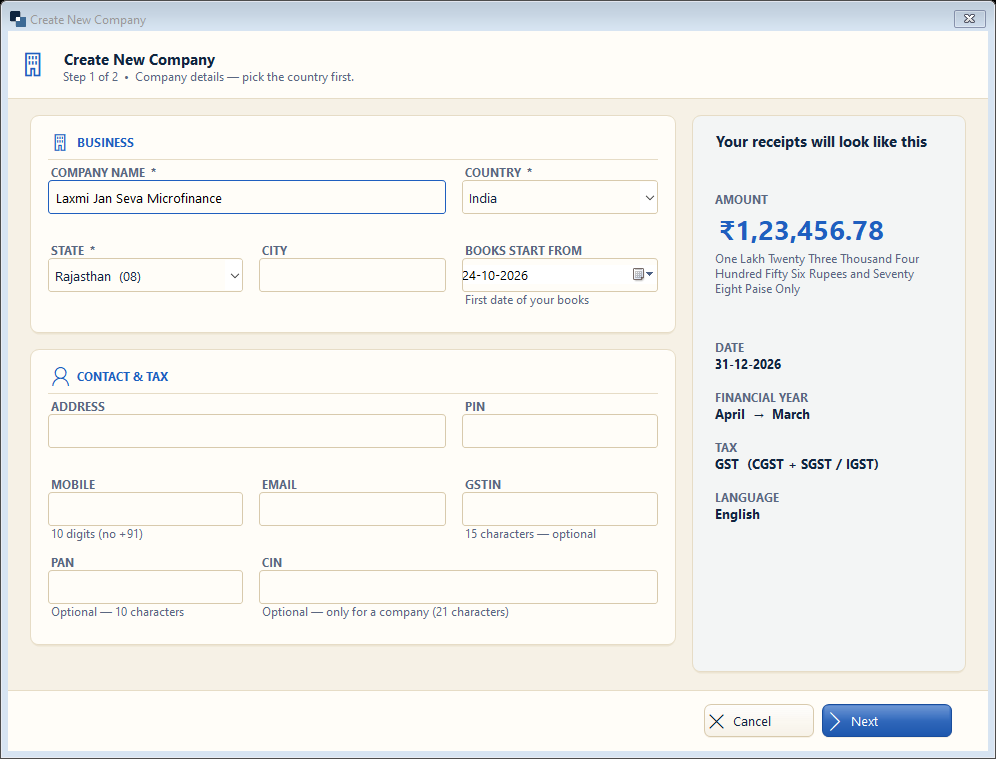
1
Company name *
What to enter: Your organisation's registered name.
Why: Printed at the top of every receipt, loan card and report.
Example:
Laxmi Jan Seva Microfinance2
Country *
What to enter: Keep India (or your country).
Why: Currency and date style follow it.
Example:
India3
State *
What to enter: Your state of registration.
Why: Used on letters and for GST on fees (if registered).
Example:
Rajasthan4
Books start from
What to enter: The date from which you enter loans in this software.
Why: Running loans from before this date are entered as opening loans.
Example:
01-04-20265
Address and PIN
What to enter: Office address and 6-digit PIN code.
Why: Printed on receipts and notices.
Example:
Main Road, Chomu — 3037026
Mobile and email
What to enter: Office mobile and email.
Why: Members see it on receipts and SMS / WhatsApp.
Example:
98765 432107
Next
What to enter: Click Next.
Why: Goes to step 2 (type of organisation).