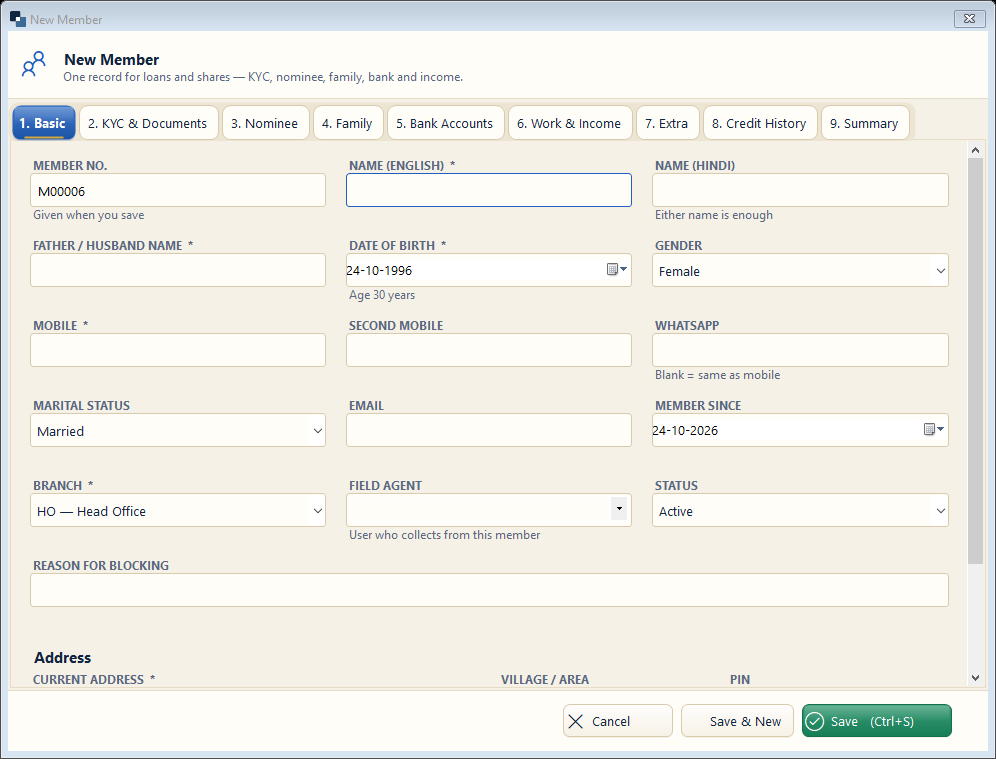
Fill the Basic tab first; the other tabs (KYC & Documents, Nominee, Family, Bank Accounts, Work & Income, Credit History) can be filled now or later. Fields with * are required.
👆 Click a number to see the field
1
Name *
What to enter: Member's name in English or Hindi — either is enough.
Why: Printed on the loan card, receipts and notices.
Example:
Sita Devi / सीता देवी2
Father / husband name *
What to enter: As in Aadhaar.
Why: Needed for KYC and legal notices.
Example:
Ram Lal3
Date of birth *
What to enter: The age is shown next to it.
Why: Age limits from your rules are checked.
Example:
10-03-19854
Mobile *
What to enter: 10-digit mobile; WhatsApp if different.
Why: Receipts and reminders go to this number.
Example:
98765 432105
Branch and field agent
What to enter: Branch and the agent who collects from this member.
Why: The agent's collection list and commission use it.
Example:
Head Office — Ramesh6
Address *
What to enter: House, village / area, district, PIN.
Why: Needed for field visits and notices.
Example:
Ward 2, Chomu — 3037027
Other tabs
What to enter: KYC & Documents (Aadhaar, PAN, photo), Nominee, Family, Bank, Work & Income.
Why: Complete KYC before the first loan.
8
Save
What to enter: Click Save (or Save & New for the next member).
Why: The member number is given when you save.
Example:
M00006