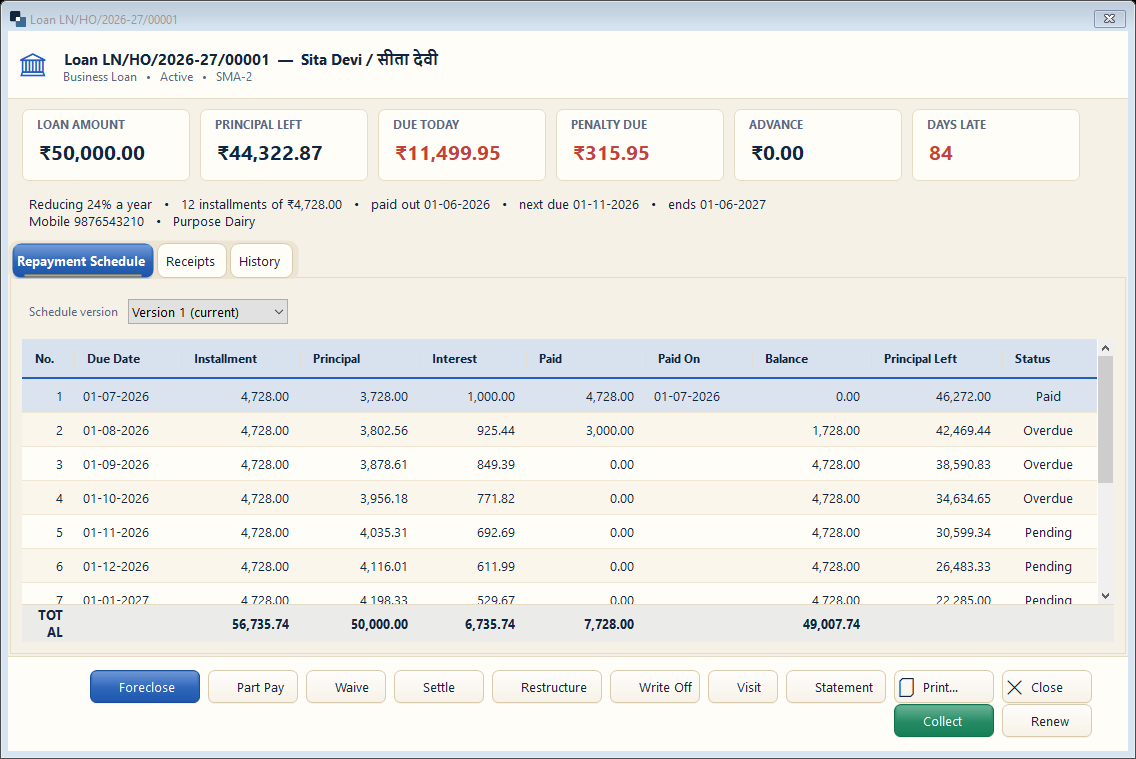
The loan screen shows amount, principal left, due today, penalty and days late, with the full repayment schedule. The buttons at the bottom do every loan action.
👆 Click a number to see the field
1
Loan summary
What to enter: Amount, principal left, due today, penalty, advance, days late.
Why: See the loan's health at a glance.
2
Schedule, receipts, history
What to enter: Every installment with paid / pending status.
Why:
3
Collect
What to enter: Take an installment.
Why:
4
Part Pay / Foreclose / Settle
What to enter: Part prepayment, full closing, or a settlement.
Why: Interest is worked out by itself.
5
Waive / Restructure / Write Off
What to enter: Waive penalty, change the schedule, or write off a bad loan.
Why: Each needs a right and is recorded.
6
Statement / Print
What to enter: Print the loan statement or the loan card.
Why: Give it to the member.