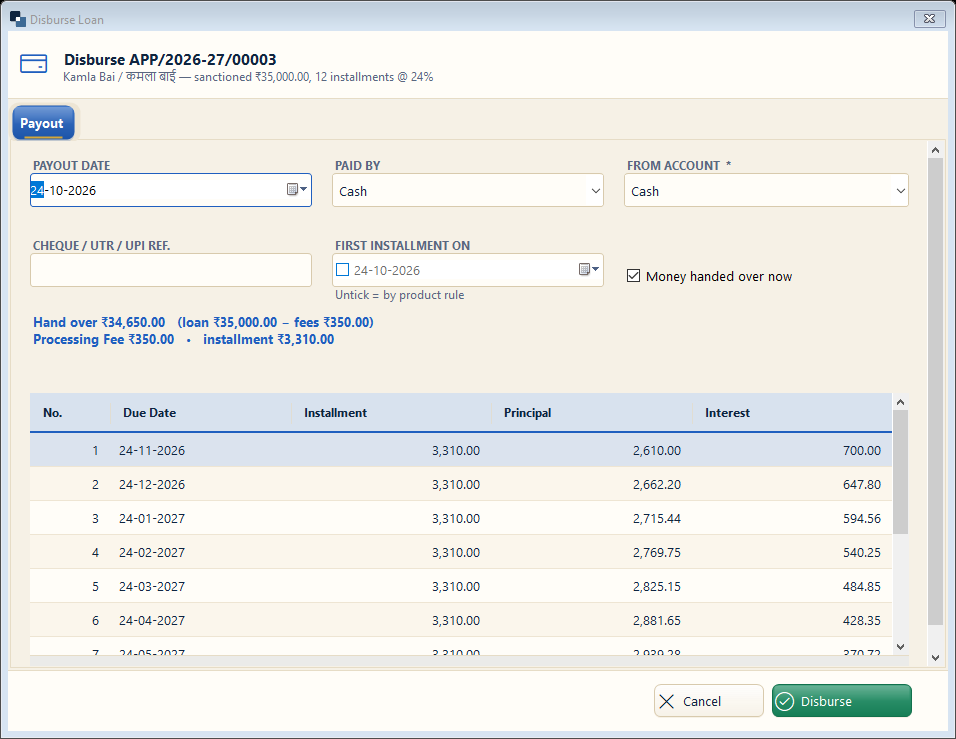
Check the payout details: fees are cut and the net amount is shown. The full schedule is shown below before you confirm.
👆 Click a number to see the field
1
Payout date
What to enter: Date the money is given.
Why: Interest starts from this date.
Example:
24-10-20262
Paid by and from account *
What to enter: Cash, cheque, NEFT / UPI and the account it goes out of.
Why: Your cash / bank book is updated by itself.
Example:
Cash3
Reference
What to enter: Cheque or UTR number for bank payouts.
Why: Proof of payment.
4
First installment on
What to enter: Leave unticked to follow the product rule, or choose a date.
Why: All due dates follow from it.
Example:
24-11-20265
Money handed over now
What to enter: Untick if the money will be paid later (pending payout).
Why: The loan then waits in Pending Disburse Payment.
6
Disburse
What to enter: Click Disburse.
Why: The loan becomes active with its schedule.