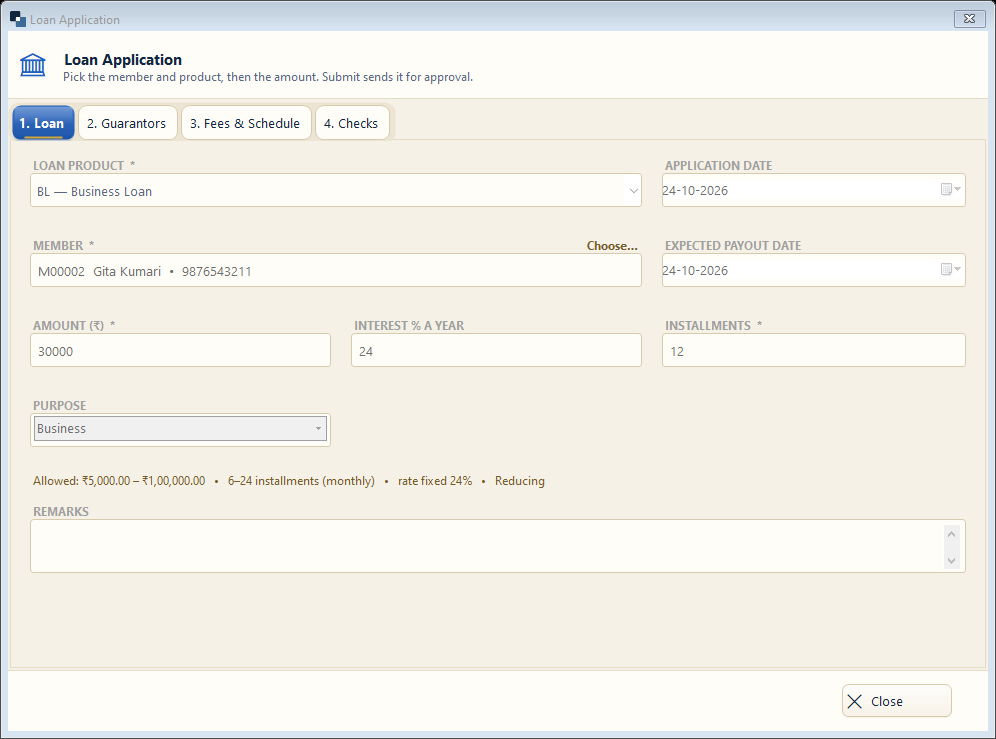
Loans → Loan Applications → New Application (F3). Tabs: Loan, Guarantors, Fees & Schedule, Checks. Submit sends it for approval.
👆 Click a number to see the field
1
Loan product *
What to enter: Choose the scheme.
Why: Rate, installments and fees are filled from it.
Example:
Business Loan2
Member *
What to enter: Click Choose… and pick the member.
Why: Checks (age, KYC, other loans) run by themselves.
Example:
Gita Kumari3
Amount *
What to enter: Amount asked.
Why: Must be within the product's range.
Example:
30,0004
Interest and installments
What to enter: Filled from the product — change if allowed.
Why: Decide the EMI.
Example:
24 % · 125
Purpose
What to enter: Why the money is needed.
Why: Shown in reports and to the approver.
Example:
Business6
Guarantors, Fees, Checks
What to enter: Add guarantors, see fees and the schedule, and the eligibility checks.
Why: A loan with failed checks cannot be approved.