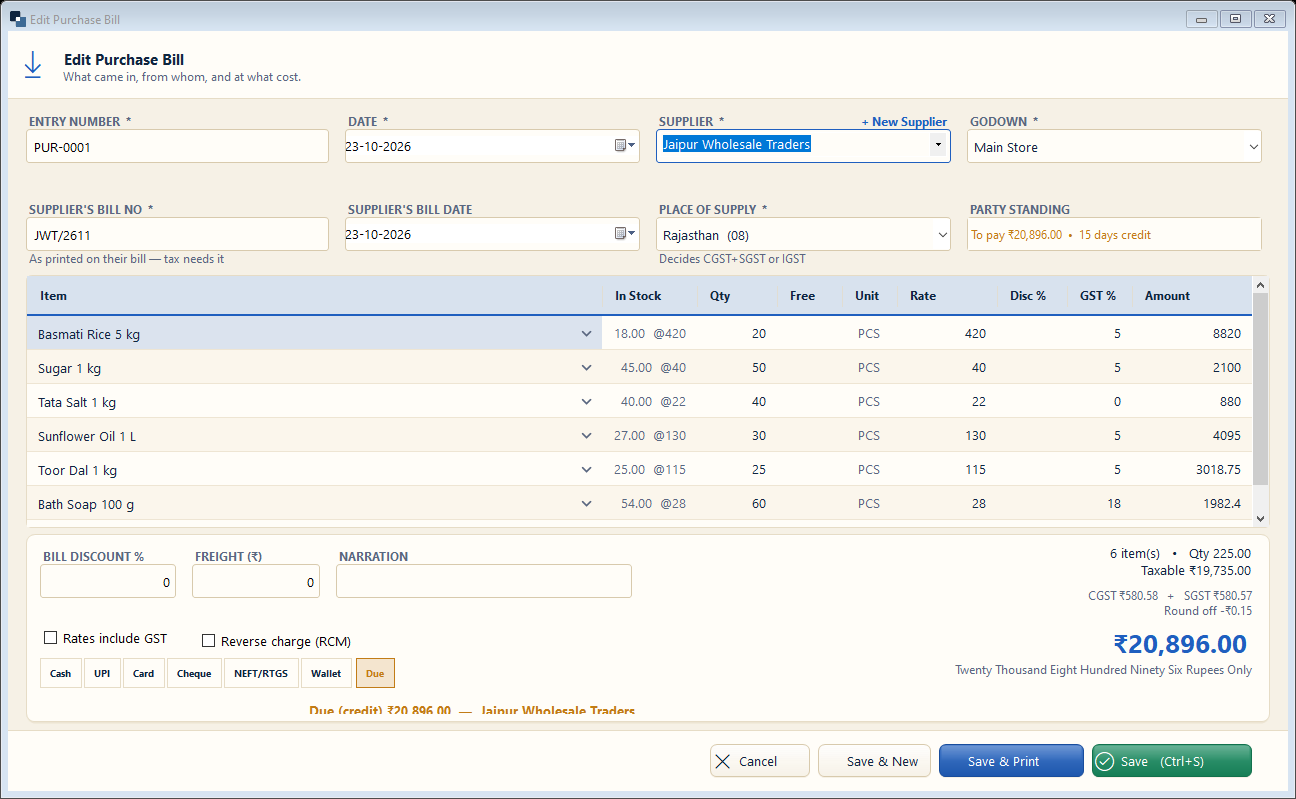
Purchase → Purchase Bill. Enter the supplier's bill exactly as received — stock increases and the supplier's due is recorded.
👆 Click a number to see the field
1
Supplier *
What to enter: Choose the supplier (or + New Supplier).
Why: The amount is added to what you owe them.
Example:
Jaipur Wholesale Traders2
Supplier's bill no and date *
What to enter: As printed on their bill.
Why: Needed for GST input credit (ITC) and to avoid entering a bill twice.
Example:
JWT/26113
Place of supply
What to enter: Filled from the supplier's state.
Why: Decides CGST + SGST or IGST.
Example:
Rajasthan (08)4
Items
What to enter: Add items with quantity and purchase rate.
Why: Stock and average cost are updated.
Example:
Sugar 1 kg × 50 @ 405
Reverse charge (RCM)
What to enter: Tick only when you pay GST instead of the supplier.
Why: Goes into GSTR-3B correctly.
6
Payment
What to enter: Pay now (Cash / Bank…) or leave as Due.
Why: Due is shown in the supplier's account.
Example:
Due7
Save
What to enter: Click Save.
Why: Stock and accounts update at once.