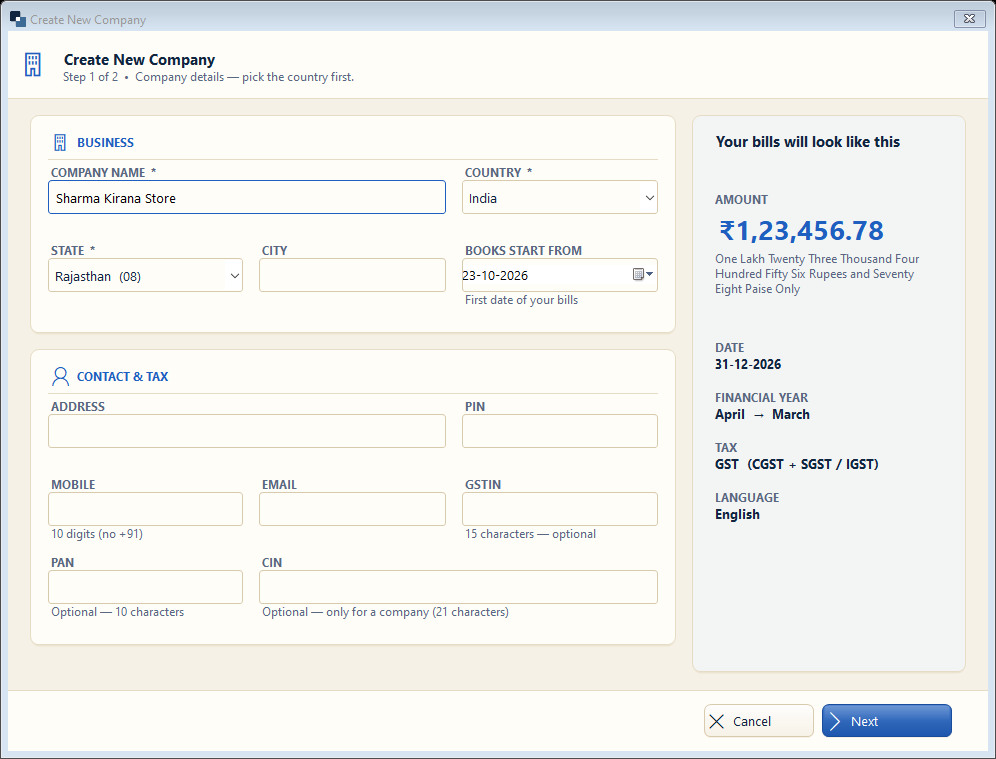
Fill these exactly as on your GST / shop registration — they are printed on every bill. Fields with * are required.
👆 Click a number to see the field
1
Company name *
What to enter: Your business / firm name.
Why: Printed at the top of every bill and report.
Example:
Sharma Kirana Store2
Country *
What to enter: Keep India (or your country).
Why: Currency, tax (GST) and date style follow it.
Example:
India3
State *
What to enter: Your state of registration.
Why: Decides CGST + SGST (same state) or IGST (other state) on every bill.
Example:
Rajasthan4
Books start from
What to enter: The date of your first bill in this software.
Why: Opening balances and stock are taken as on this date. New business: today. Running business: 1 April of this year.
Example:
01-04-20265
Address and PIN
What to enter: Shop / office address and 6-digit PIN code.
Why: Printed on bills; needed for e-way bills.
Example:
Main Bazar, Chomu — 3037026
Mobile and email
What to enter: 10-digit mobile (without +91) and email.
Why: Shown on bills; used for WhatsApp / email of bills.
Example:
98765 432107
GSTIN
What to enter: 15-character GST number — only if you are GST registered.
Why: With GSTIN the bills become “Tax Invoice” and GST returns can be prepared.
Example:
08ABCDE1234F1Z58
PAN / CIN
What to enter: PAN (10 characters) is optional. CIN only for a Pvt Ltd / LLP company.
Why: Printed on bills when filled.
Example:
ABCDE1234F9
Preview
What to enter: Nothing to fill — just check.
Why: Shows how amounts, dates and tax will look on your bills.
10
Next
What to enter: Click Next.
Why: Goes to step 2 (business type).