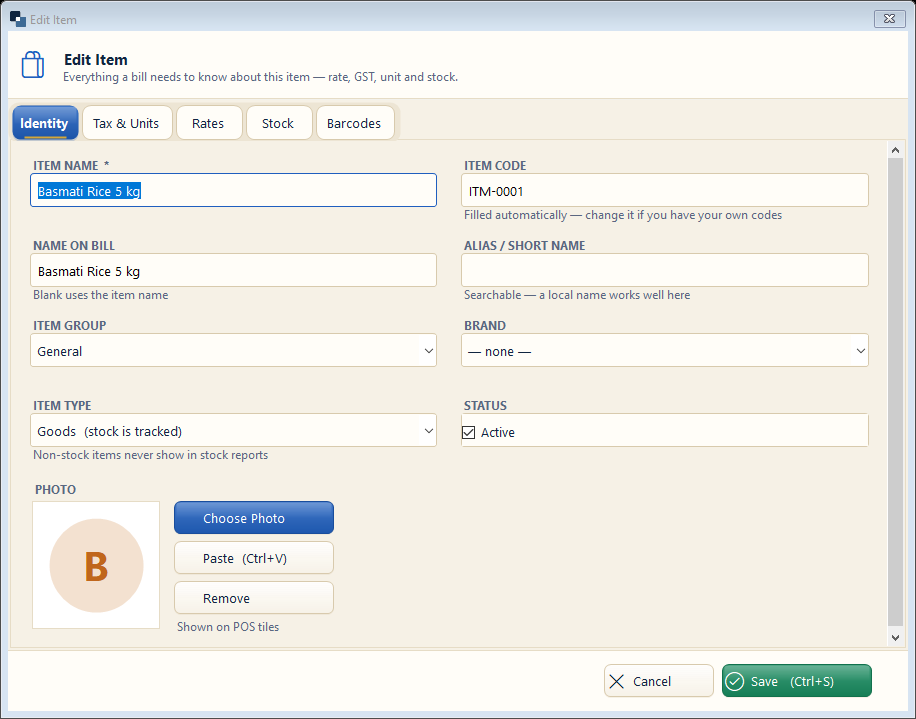
The item form has tabs: Identity, Tax & Units, Rates, Stock and Barcodes. Fill Identity first, then Tax & Units and Rates.
👆 Click a number to see the field
1
Item name *
What to enter: The name your customers know.
Why: Searched while billing and printed on the bill.
Example:
Basmati Rice 5 kg2
Item code
What to enter: Filled automatically; change if you have your own codes.
Why: Codes are faster to type at the counter.
Example:
ITM-00013
Name on bill
What to enter: Leave blank to print the item name.
Why: Use a shorter or local name on the bill if needed.
4
Item group and brand
What to enter: Choose a group (category) and brand.
Why: Reports and the online store use them.
Example:
Grocery / India Gate5
Item type
What to enter: Goods (stock is tracked) or Service (no stock).
Why: Services never show in stock reports.
Example:
Goods6
Tabs
What to enter: Open Tax & Units for HSN, GST % and unit; Rates for purchase, sale and MRP.
Why: GST and rates on the bill come from here.
Example:
HSN 1006, GST 5%7
Save
What to enter: Click Save (Ctrl+S).
Why: The item is ready for bills.